


MX Player
4.2163.74K Reviews
App Specs
- Version
- 3.0.12
- Updated On
- License
- Free
- Downloads
- 1,000,000,000+
- Developer
- Amazon Mobile LLC
- Categories
- Video Players & Editors
- Platform
- Android, iOS
Screenshots
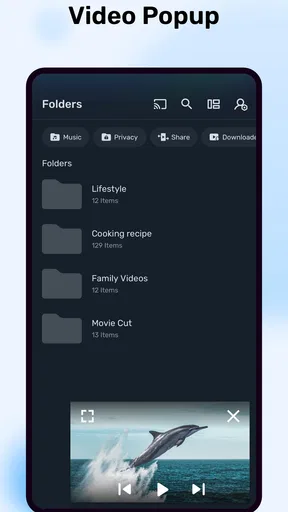
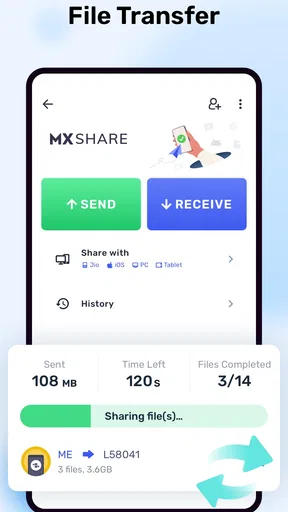

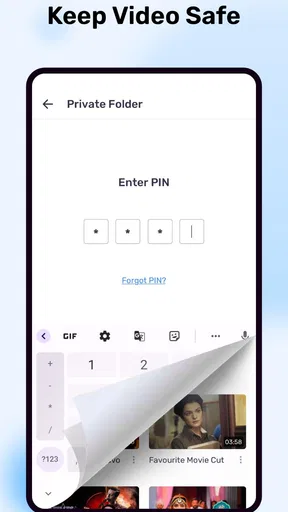
 Analysis by AppCompare
If you're anything like me, sometimes you just need a break from the endless stream of streaming platforms, and that's where MX Player comes in. This nifty app is like having a mini theater in your pocket, ready to play almost any video format you throw at it. Whether you're watching the latest blockbuster or your collection of old TV shows, MX Player has your back.
That description fits best when I think of it as a player for videos already on my device, rather than as a replacement for every streaming service. If I have a saved episode, a clip someone sent me, or a subtitle file to go with a film, a dedicated player can be more useful than opening a subscription app and hoping the title is available there. The distinction matters: this is a tool for watching and managing playback, not a promise that every film or show is included.
For a practical example, imagine saving a few videos before a train ride, then switching between them while the connection is unreliable. A local player is useful in that situation because watching saved files does not depend on a live stream staying steady. I would still check that the files are actually on the phone before leaving; an online video option and a stored video are not the same thing, and buffering or access can depend on the connection and source.
Guides and Analysis on MX Player
Getting Started with MX Player
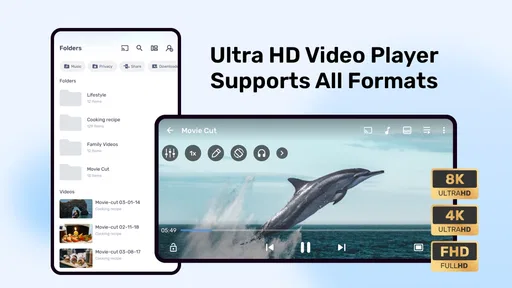
First things first, downloading MX Player is a breeze. Available on both Android and iOS, it installs quickly and seamlessly. Once you're in, the clean interface greets you, and trust me, it's user-friendly enough that even your grandma could navigate it without calling you for help. The app's main screen displays your media library, and the intuitive navigation means you won't waste time searching for your favorite flick.
In everyday use, the library view is most helpful when you keep a growing collection of clips and episodes on your phone. I find it sensible to give files recognizable names before adding them, especially when several videos have similar thumbnails or generic filenames. That small bit of housekeeping makes browsing quicker and avoids relying on memory to tell one episode from another. If you mainly watch through a streaming service, though, a player focused on local files may not simplify your routine as much as the service’s own app.
MX Player is a free video player from Amazon Mobile LLC, and its long presence in the category helps explain why many people encounter it when looking for an alternative to a phone’s built-in player. It has a 4.2 average from around 14 million ratings and has passed one billion installs. Those figures suggest broad familiarity, but they are not a substitute for checking whether its playback style suits your device and habits.
The app is rated for Everyone, and its current version is 2.5.2. It is listed for devices running Android 7.0 or later, while the exact experience can vary with the phone, file, and operating system. I would treat compatibility as a practical question: if a particular video matters, test it on your own device rather than assuming that every file will behave identically across phones.
Worth Reading Before You Choose

ESPN’s Live Game View Makes Following Close Games Easier

QuizzLand Review: A Good Fit for Short Trivia Breaks, Not Every Player

Basketball Stars: Multiplayer Is Fast, but Can It Recover When Matches Go Wrong?

WEBTOON Turns Phone Updates Into a Better Reading Routine

Link to Windows Runs on Shared Habits, Not Social Feeds

How Alibaba.com Dominates the B2B Marketplace
Features that Stand Out
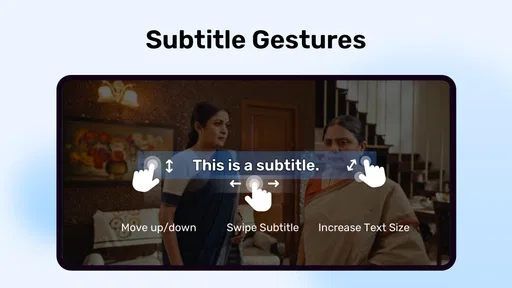
One of the best things about MX Player is its versatile video playback capability. It supports a wide range of formats, which is a lifesaver if you've ever been frustrated by "unsupported format" messages. Not only that, but the app also supports subtitles in a variety of languages. So, whether you're brushing up on your Spanish or diving into Korean dramas, you're covered.
Subtitles can also make a difference when you are watching in a shared room or trying to follow quiet dialogue without raising the volume. My practical suggestion is to check that a subtitle file matches the video’s name and version; otherwise, its timing or wording may not line up. When subtitles are available, their presence is useful, but I would not assume every language or file will be a perfect match. For a video where caption accuracy is essential, previewing a short section first can save frustration later.
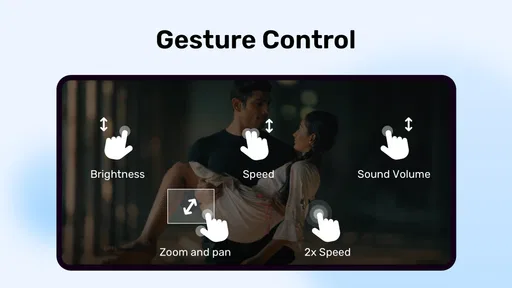
Now, let's talk about the hardware acceleration feature. This is where the app really shines, offering smoother playback and the ability to handle high-definition video without turning your phone into a mini toaster. Plus, the gestures for volume and brightness control are super convenient, allowing you to make quick adjustments without interrupting your viewing experience.
Those playback controls are especially handy when you are watching one-handed on a commute: a quick brightness adjustment can be less disruptive than leaving the video to dig through the phone’s settings. I would take a moment to learn the gestures before handing the phone to someone else, since touch controls that feel natural to me may be unfamiliar to them. Hardware acceleration is another useful option to keep in mind, but smooth playback still depends on the file and device; if one video stutters, trying a different version of that file may be more effective than blaming the whole app.
Compared with the player built into a phone, MX Player may appeal to someone who wants broader format support and more direct control over watching local files. Compared with a streaming app, it serves a different purpose: it does not make a paid catalogue or online library the centre of the experience. I would choose the built-in player for occasional, uncomplicated clips, a streaming service for discovering licensed shows, and this app when playback flexibility and subtitles are the priority.
Additional Perks and Little Quirks
One feature that's worth mentioning is the Kids Lock. It keeps the young ones from accidentally exiting the app or making changes, so you can hand over your device for some peace and quiet without worrying about it becoming a digital canvas for tiny fingers. Another cool feature is the ability to stream online content, transforming the app into more than just a local media player.
For a parent, that lock can make a short video less stressful to share: a child is less likely to tap away from playback by mistake. I would still set up the video and check the screen before handing over the device, because a playback lock is not the same as a child account or a wider device-level safety setting. That distinction is worth keeping in mind whenever a phone is shared.
The online-content option is useful when the source is something I already intend to watch, but I would not treat it as a substitute for a familiar streaming service. Online playback depends on the source and connection, while a downloaded file is more predictable when travelling or dealing with weak reception. If you want a single place for recommendations, subscriptions, and a curated catalogue, a dedicated streaming app is likely a better fit.
On the flip side, while the free version of MX Player is packed with features, it comes with ads. They aren't overly intrusive, but if you're someone who values an ad-free experience, the premium version might be more up your alley. Also, while the app is generally very stable, there are occasional minor bugs, but these are typically resolved with updates.
There are in-app purchases, with listed items ranging from $0.49 to $239.99, so I would look carefully at the purchase screen before confirming anything. The free price makes it easy to try the player, but it does not mean every optional purchase is necessary for basic playback. Ads are a more immediate trade-off: if they interrupt the way you watch or make the app feel cluttered, a simpler built-in player may suit you better than paying for extras you do not need.
Privacy, Trust, and Practical Choices
When I assess a media app, I try to separate what I can actually control from assumptions about what happens behind the scenes. Before using MX Player, I would review the permissions Android or iOS presents and grant only the access that makes sense for the task I want to do. A video player needs access to the media I choose to play, but I would pause before approving any request that seems unrelated to that use.
It is also worth noticing the choices visible inside the app and on the device: whether an online feature is optional for my viewing, whether I want to make a purchase, and whether I am comfortable with the free experience and its ads. I would not infer a complete privacy picture from the player’s features alone. For anyone handling sensitive personal videos, the cautious approach is to check the operating system’s permission controls and use device-level protections rather than assuming that a media app itself provides private storage.
That does not make MX Player unsuitable; it simply means I would use it deliberately. If I only want to play a video stored locally, I can keep my use focused on that task and avoid online content or purchases I do not need. If I am uncomfortable with advertising, app permissions, or the way a particular device presents its controls, I would compare the available settings and consider a more minimal player instead.
Who Will Get the Most from It
I would recommend MX Player to people who regularly watch downloaded videos, rely on subtitles, or have run into format problems with a basic player. It is also a sensible choice for someone who wants easy playback controls without turning video watching into a larger streaming-and-discovery experience. The gesture controls, subtitle support, and Kids Lock serve different needs, so the app can work for solo viewing as well as sharing a phone briefly with a child.
I would skip it if nearly all your viewing happens inside subscription services, if you want a carefully curated catalogue, or if you prefer the fewest possible controls and interruptions. In those cases, the streaming service you already use or the phone’s standard player may be enough. The right choice depends less on which app has the longest feature list and more on whether you actually watch files that need a more flexible player.
Final Thoughts
All in all, MX Player is a fantastic addition to your app collection, especially if you're a video aficionado like me. It combines functionality with ease of use, making it a go-to choice for media playback. Whether you're on a commute, lounging at home, or just need a reliable app to keep your videos organized, MX Player delivers. So go ahead, give it a try, and elevate your viewing experience.
My recommendation is a little more specific: try it if you often play videos saved on your phone and want useful controls, subtitle support, or a way to keep small hands from interrupting playback. Pay attention to the permissions and purchase prompts you see, and decide whether the ads are an acceptable cost of using the free version. If those trade-offs suit you, it is a practical player to keep around; if your priority is a quiet, minimal experience or a streaming library, another option may fit better.
Pros
- Supports a wide range of video formats.
- Smooth playback with hardware acceleration.
- User-friendly interface and easy navigation.
- Subtitle support with customizable options.
- Offline video playback is available.
Cons
- Contains ads in the free version.
- Advanced features require a premium upgrade.
- Some codec support might need manual installation.
- Battery consumption can be high during playback.
- Limited cloud integration for media backup.
FAQs for MX Player
What are the main features of MX Player?
MX Player offers a range of features including hardware acceleration, multi-core decoding, and subtitle support. It allows users to play various video formats seamlessly. Additionally, it provides gesture controls for volume and brightness, as well as a kids lock feature to ensure safe viewing for children.
Is MX Player free to use?
Yes, MX Player is free to download and use. However, it offers a premium version called MX Player Pro, which is ad-free and provides additional features. The free version is supported by ads, which can be removed by purchasing the Pro version through in-app purchases.
What video formats does MX Player support?
MX Player supports a wide range of video formats, including MP4, AVI, MKV, and FLV. The app is designed to handle most video codecs, ensuring that users can play almost any video file without the need for additional plugins or codecs. This versatility makes it a popular choice for video playback.
Can MX Player play videos with subtitles?
Yes, MX Player supports various subtitle formats such as SRT, SUB, SSA, and more. Users can easily load subtitles for their videos and even customize the appearance, including font size, color, and position. This feature enhances the viewing experience, especially for foreign films or shows.
Is MX Player available on both Android and iOS?
MX Player is primarily available on Android, where it enjoys a large user base. A version of MX Player is available for iOS, but it may have different features or limitations compared to the Android version. Users should check the specific app store for availability and feature details on their device.


